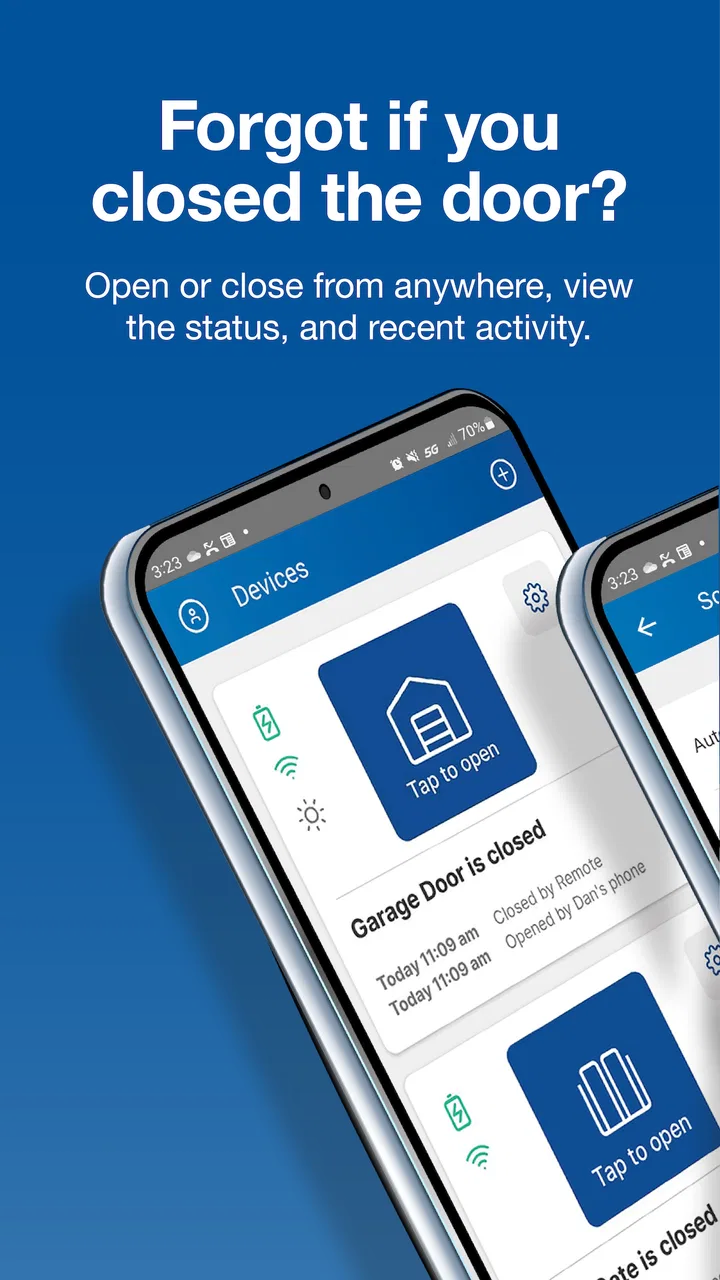
Nice G.O.
- 4.6
- Rating
- 10.00K
- Installs
- Free
- Price

 Analysis by App-foxy
Opening a garage door from a phone sounds like a small convenience, but it becomes surprisingly useful when the garage is part of your daily routine. I spent time looking at Nice G.O. as a home-control app, and my impression is that its appeal comes from doing one focused job: giving you mobile access to compatible garage doors instead of making you rely only on a wall button or a traditional remote. It is a free app in the House & Home category, developed by Nice North America LLC, and its purpose is easy to understand from the first use.
Nice G.O. is best viewed as a digital companion for garage access rather than a complete smart-home command center. That distinction matters. If all you want is a practical way to control a compatible garage door from your Android or iOS device, the app has a clear reason to exist. If you are expecting broad home automation, a large collection of connected devices, or a replacement for every part of a security system, its narrow focus may feel limiting.
How the app fits into everyday garage access
The most useful way to think about this app is as an extra control point. Your phone is already with you when you leave for work, return home, or arrive with shopping, so having garage-door access in the same device can reduce the need to carry a separate remote. That is especially practical for households where several people need access and where a phone is easier to keep track of than another small accessory.
You May Also Like

 AccuWeather: Weather Radar
AccuWeather Review: A Quick, Clear Forecast for Everyday Decisions
For everyday plans, the best forecast is the one you can understand quickly. AccuWeather makes rain timing, radar, and local conditions easy to act on, with a few trade-offs.

 Hill Climb Racing
Why Hill Climb Racing Still Turns Crashes Into One More Run
A tiny car, a bumpy hill and one more upgrade: Hill Climb Racing keeps resurfacing because its simple chaos makes every near-miss feel personal.

 AliExpress - Shopping App
AliExpress Makes Global Shopping Feel Personal, but Shoppers Bear the Risk
AliExpress turns a global marketplace into a pocket-sized discovery engine. Its reach is useful, its shopping loop compelling, and its trade-offs easy to miss.

 Lords Mobile: Kingdom Wars
Lords Mobile Is a Kingdom-Building Routine, Not a Quick Match
A case-by-case verdict on the building, battles, device demands, and social commitments that make Lords Mobile rewarding for some players and exhausting for others.

 PDF Scanner app - TapScanner
TapScanner Makes Paperwork Easier to Capture, Check, and Share
TapScanner makes scanning with a phone feel less like a rescue operation and more like a dependable step in getting work done. Its capture tools are useful, though not flawless.

 Block Blast!
 Shows How Much a Puzzle Game Can Leave Out
A quiet grid game shows why puzzle players increasingly value instant clarity, repeatable skill and low-pressure play—and where the genre still needs to catch up.
More From Our News Desk
View All News


A realistic example is arriving home with both hands occupied. Instead of searching for a remote in the car, I can use the phone I am already holding to access the garage through the app. The benefit is not dramatic every time, but it removes a recurring bit of friction. The same idea applies when leaving: checking the garage before driving away is more convenient when control is available through the mobile device.
The app’s store summary describes mobile access and control of garage doors, and that focus is reflected in the overall experience. It does not try to bury the main task under unrelated home features. For a person who wants a direct route to garage control, that simplicity is a strength. The trade-off is that the experience depends heavily on whether the garage setup is compatible and properly connected in the first place.
That compatibility question should be your first practical check before you make the app part of your routine. A phone app cannot compensate for an unsuitable opener, an incomplete setup, weak connectivity, or a device that is not supported by the surrounding Nice system. I would not treat installation alone as proof that your garage is ready. Confirming compatibility and completing the setup carefully is more important than downloading the app quickly.
What the free price really means
Nice G.O. is free to download, so there is no purchase decision inside the basic entry point itself. That makes it easy to try, particularly if you already use a compatible Nice garage-door arrangement. The free price is valuable because it lets the app serve as an additional control method without asking you to pay simply to test whether mobile access suits your routine.
Still, free access to an app should not be confused with a free smart-garage installation. The app is software, while the opener, connectivity equipment, and any required setup belong to the wider garage system. I would evaluate those separately. If you already have the right hardware, the app can add convenience at no app charge. If you are starting from nothing, the overall cost depends on the equipment and installation choices you make, not on the download alone.
This distinction is important when comparing it with a conventional remote. A remote may already be included with a garage opener or may be purchased as a separate accessory, while a phone-based option trades that dedicated simplicity for the convenience of using a device you already carry. Nice G.O. is therefore most attractive when the supporting hardware is already in place or when mobile access is a priority during a garage upgrade.
Getting started without making the setup harder than necessary
I recommend approaching setup as a home-access task rather than an ordinary app installation. Before opening the app, identify which garage door or opener you want to control and make sure you are near the equipment during the initial configuration. Having the relevant hardware available can prevent the frustrating situation of trying to solve a connection issue from another room or while away from home.
Use a clear account arrangement for the household. If several people need access, decide who should manage the primary setup and who simply needs day-to-day control. This avoids a common smart-home mistake: sharing one login casually and then losing track of who can access the garage. Even when an app is simple, garage access deserves more care than sharing a streaming account.
After setup, test the control while you are still at home. Open and close the door deliberately, watch the physical result, and make sure the app’s response matches what happens in the garage. A first test is also a good time to check whether your phone has a reliable connection in the places where you expect to use the app, such as the driveway, inside the garage, or at the end of the street.
My practical tip is to keep the traditional wall control or remote available during the first few days. Mobile control should be an added convenience, not the only way you can operate the door before you trust the setup. This is particularly sensible for households with more than one user, because problems are often caused by account or device configuration rather than by the main app screen itself.
Where the app delivers real value
The strongest value is convenience through consolidation. Your phone can become the device you use for garage access, which means one less remote to remember, replace, or move between vehicles. That is useful for people who regularly switch cars, use rental vehicles, or simply dislike keeping several small remotes in the cabin.
It can also help in situations where a physical remote is inconvenient. Imagine a family member arriving while you are already inside the house, or a delivery that needs to be placed in the garage. Mobile control may make that interaction easier than walking to the wall button or finding a spare remote. I would not describe this as a reason to buy a complete garage system by itself, but it is a meaningful advantage once the compatible setup exists.
Another benefit is routine flexibility. A dedicated remote usually stays in one vehicle, while a phone travels with its owner. That makes app-based access more adaptable for households with multiple drivers. The trade-off is that the phone must be charged, unlocked or otherwise usable when needed, and connected well enough for the command to reach the garage system. A remote is less dependent on those everyday phone conditions.
The app’s audience is also reflected in its broad age classification: it is rated Everyone. That does not mean every child should be given garage access. It simply makes the app suitable as general household software from an age-rating perspective. In practice, I would still keep access limited to trusted users because a garage door is an entry point to the home, not just another appliance.
Small workflow improvements that make mobile control more useful
One useful habit is to place the app where it can be reached quickly, rather than leaving it buried in a crowded folder. Mobile garage access is most valuable when it is faster than searching for a remote. A home-screen shortcut, a clearly named folder, or a consistent routine can make the difference between a genuinely convenient tool and an app you forget exists.
Another is to test the app from the locations where you actually need it. Garage access can feel reliable inside the home but less convenient from the driveway or farther away. I would test it at different points around the property and at different times of day, not to create a technical benchmark, but to understand your own routine. If the app is slow or unreliable in the place where you normally use it, the free download has limited practical value.
For a shared household, establish a simple rule about who uses mobile control and when. One person opening the door while another assumes it is closed can create confusion. A quick verbal check is worthwhile when two people are arriving or leaving at the same time. The app can provide control, but it does not replace household communication.
I also suggest keeping a backup plan. A physical remote, the wall control, or another established method should remain available for situations such as a dead phone battery, a lost device, or a connectivity problem. This is not a criticism unique to Nice G.O.; it is a general weakness of turning a phone into a necessary household control. The best setup treats the app as a convenient layer, not the sole point of failure.
Trade-offs compared with the usual alternatives
The obvious alternative is a standard garage remote. Its main advantage is focus: press the button and the door responds. It does not require you to find an app, look at a screen, or depend on the phone being charged. For a person who drives the same vehicle every day and already has a reliable remote, the app may not feel essential.
Nice G.O. becomes more compelling when the phone is more convenient than the remote. People who move between vehicles, share access with family members, or want to avoid carrying another accessory may prefer mobile control. The decision is less about which method is universally better and more about which object is consistently with you when you need the door.
A second alternative is a broader smart-home platform. That kind of system may appeal to someone who wants garage access alongside lighting, cameras, locks, thermostats, and routines. Nice G.O. is a better fit for someone who wants a focused garage-door app and does not need a large dashboard for unrelated devices. Its narrower purpose can make it easier to understand, but it may feel incomplete beside a fully integrated home-control setup.
There is also a security trade-off. A remote can be misplaced, while a phone can be lost, shared, or left unlocked. On the other hand, a phone may offer familiar device-security habits that a small remote does not. I would protect the phone and account carefully, avoid casual credential sharing, and remove access from devices that no longer belong to household members. The app is part of your access arrangement, so account hygiene matters as much as the button itself.
Connectivity is another consideration. A traditional remote is designed for a direct local interaction, while an app-based workflow depends on the phone and the connected garage equipment working together. If you live in a place with unreliable connectivity or often need access when your phone is unavailable, the remote remains the safer primary method. Mobile control is most useful when convenience outweighs that dependence.
Who is likely to appreciate it most
I see the clearest value for households that already have a compatible Nice garage setup and want a phone-based control option without paying for the app. It also suits people who regularly forget or misplace remotes, families that use more than one car, and users who prefer keeping everyday access tools on their phones.
It may be particularly practical for a homeowner who lets trusted relatives or regular visitors use the garage. Mobile access can be easier to manage conceptually than handing out another physical remote, although I would still be deliberate about which people receive access and how that access is removed later. The convenience is worthwhile only when the household treats garage control as a security-sensitive function.
Renters and people in shared buildings should think more carefully. If you do not control the opener or cannot change the garage equipment, the app may not solve your access problem. Likewise, someone who only uses a garage occasionally may gain little from adding a phone workflow when a normal remote or wall control already handles the job.
I would also skip it as a primary solution if you strongly prefer offline controls, dislike account-based home technology, or do not want your phone involved in opening the garage. The free price removes a financial barrier to trying it, but it does not remove the practical requirements of compatible hardware, a usable phone, and a reliable setup.
What the current app details suggest
The app was released on September 13, 2023, and the current version is 1.1.10. It requires Android 10 or later, which is reasonable for many current phones but still worth checking before you plan around it. An older Android device may be the deciding factor even though the app itself is free.
Its audience appears established enough to offer some useful public feedback: it has a 4.6 average from around 1.7 thousand ratings, with more than 270 written reviews and over 10 thousand installs. I treat those figures as helpful context rather than a guarantee. Garage setups differ, and an experience that works smoothly for one household can still require extra troubleshooting in another.
The developer, Nice North America LLC, gives the app a clear connection to the Nice garage ecosystem. That is reassuring for users who already own compatible Nice equipment, but it also reinforces the importance of staying within the intended hardware environment. I would not choose it merely because the app looks convenient; I would choose it because the garage system and the app belong together.
My verdict on the free download
Nice G.O. is worth trying when your garage is compatible and you want mobile access without paying for the app itself. Its best quality is not a long list of features but the removal of a small, repeated inconvenience: needing a separate remote for a task that can be handled from the phone already in your hand.
My recommendation comes with a practical boundary. Keep a backup control method, test the app from real use locations, and be careful about who receives access. If you want a simple garage-focused tool, those precautions are reasonable and the free price makes experimentation easy. If you want a full smart-home hub, offline reliability above all else, or a solution that works independently of compatible Nice equipment, a conventional remote or a broader platform may suit you better.
For the right household, I would recommend it as an additional access method rather than a complete replacement for every other control. It delivers useful convenience, especially for shared homes and people who rely on their phones throughout the day. Just remember that the real value comes from the complete setup around the app. The download is free; dependable garage access still depends on choosing compatible equipment and building a backup-friendly routine.
FAQs for Nice G.O.
01What is Nice G.O. and how does it enhance my gaming experience?
Nice G.O. is a dynamic mobile game designed to merge engaging gameplay with stunning graphics. It offers a unique blend of strategy and adventure, challenging players with various levels and missions. The game is regularly updated to provide fresh content, ensuring a thrilling and ever-evolving experience for gamers.
02Are there in-app purchases in Nice G.O., and are they necessary to progress?
Yes, Nice G.O. includes in-app purchases that allow players to acquire special items, power-ups, or character enhancements. However, these purchases are optional. The game is designed to be fully enjoyable without spending money, as it rewards skill and strategic thinking, allowing players to progress naturally through gameplay.
03Is Nice G.O. suitable for all age groups?
Nice G.O. is designed to be family-friendly, with content suitable for a wide range of ages. While the gameplay is straightforward enough for younger players, it also includes complex challenges that may appeal to older gamers. It's always recommended for parents to review any game content to ensure it aligns with their preferences.
04What are the device requirements to install and play Nice G.O.?
Nice G.O. is compatible with most modern Android and iOS devices. It requires a minimum operating system of Android 6.0 or iOS 10.0, and at least 500 MB of free storage space. A stable internet connection is recommended for downloading updates and accessing certain game features.
05How does Nice G.O. ensure player data privacy and security?
Nice G.O. prioritizes player privacy and data security by adhering to stringent protection protocols. The game collects minimal personal information and uses advanced encryption to safeguard user data. Players can also customize their privacy settings, ensuring transparency and control over their information.
Pros
- User-friendly interface with intuitive navigation.
- Wide variety of customization options available.
- Seamless integration with social media platforms.
- Frequent updates with new features and improvements.
- High-quality graphics enhance user experience.
Cons
- Occasional lag on older devices.
- Ads can be intrusive during usage.
- In-app purchases can add up quickly.
- Limited offline functionality.
- Requires significant storage space.

Nice G.O.
Gallery